The new editor has the potential to be an amazing experience. While there’s a lot of kinks to be ironed out, there are some less appreciated consequences, that lead to more exciting places!
I’m a strong believer that the new Gutenberg editor introduces a landmark shift in WP UX design for WordPress. Similar to the customiser, the new editor goes one step further with a direct manipulation interface, with blocks as its unit of choice.
The ability to arrange and assemble content with blocks is powerful, and makes a lot of the existing features of WordPress look obsolete and restrictive when taken to its ultimate conclusion.
So lets extend this to its logical conclusion, and see what the future has in store.
Content Blocks Replace Shortcodes
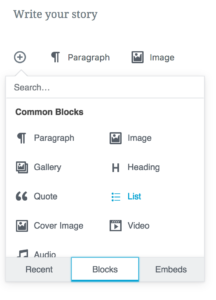
Content blocks are the new shortcodes. In the new editor, when using a shortcode, it’s stored as a content block. I believe that in the future there will be no need to build shortcodes when content blocks can be used.
With better javascript support, and a framework for modifying them with UI’s, content blocks are both friendlier to developers, and easier to use.
Content blocks Deprecate Widgets and Sidebars
The new blocks API is far more flexible than the Widgets API. For legacy reasons widgets should be usable inside the new editor, but I would go one step further and suggest that all content blocks should appear as widgets.
We should also deprecate Sidebars. If the new editor can embed widgets, then why shouldn’t sidebars be a post type that uses the new editor? This would mean that sidebars:
- support imports and exports
- can be other posts instead of sidebars
- share a common UI
Finally, a large chunk of legacy code can be deprecated and simplified, while remaining backwards compatible.
The New Editor Replaces the Sidebar & Widgets UI
Instead of our current widget UI, Gutenberg makes a lot more sense. You can type out your sidebar adding blocks and arbitrary content as easily as writing a post or page. Copying and pasting widgets becomes easy, and with a common UI, so does dragging blocks from one tab to another.
Page Builder Plugins are on Borrowed Time
With a drag and drop block based editor, page builders make little sense.Nobody wants a short code soup, and nobody wants the complex interfaces authors build to hide them.
Why would anybody put up with difficult experiences when we can have a great native experience everywhere? The consistency of having a single UI to learn with the backing of the entire community has many untold virtuous cycles
Easier Theming
In this world, the only thing a frontend developer and designer need worry about are the header, footer. Once those are in places, they can focus on how each block looks. These can be specialised blocks for different pages. Perhaps a homepage banner block?
What’s more, what’s to prevent a theme pre-filling the editor with suggestions such as featured image placement? Or using the APIs to insert the blocks at runtime.
We can already see this happening over on the Make WordPress blog, with videos of themes being loaded into the Gutenberg editor for a full WYSIWYG experience.
I foresee the biggest obstacle will be documentation. It’s much easier to use a recent posts block, or a page list block, but new developers will still resort to legacy functions such as wp_page_list, making lives harder. Strong and clear documentation will be needed.
Gutenberg for Theme Layout
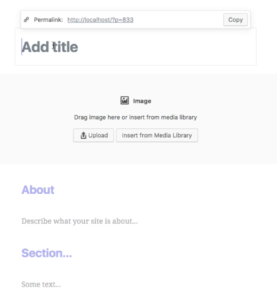
Gutenberg might define a sites overall structure. Imagine a layout screen with a main content block, and blocks representing sidebars. Entire layouts can be created with flexible rows and columns. Put a header at the top and a footer at the bottom and you have a theme.
This could be enormous, removing the need for custom page templates. It also simplifies theming to a collection of blocks, a layout grid and header/footers. Predefined layouts can be made with the UI, and bundled with themes to give a head start.
This is a huge boost to new users and developers
Meta boxes are on Their Way Out
A lot of the metaboxes in WordPress sites don’t make sense in the context of Gutenberg. While some UIs will need to transfer over in a similar fashion, some imagination can help eliminate metaboxes entirely.
Featured images for example, don’t need to appear as a metabox, or in the settings sidebar at all. Instead they can appear inline with special styling. This direct manipulation model is mobile friendly and more intuitive.
User Bios & Term Descriptions Should Support Content Blocks
Term descriptions and User biographies should use the Gutenberg editor. These neglected spaces are an opportunity for consistency and expansion. We have the tools, and I see the beginnings of a UI overhaul. With the new block interface, this could revolutionise how author and taxonomy archives are built.
There’s a lot Changing
There’s a promising future for WordPress if people reach for it, and this editor is a great enabler. What do you think of the new editor? What opportunities can you see?


Leave a Reply